128GB USB 3.0 フラッシュドライブ搭載 VHS デジタルコンバーター

SKU: CHR101-U3
通常価格 $139.99 USD
送料無料

在庫十分!すぐに発送可能

128GB USB 3.0 フラッシュドライブ搭載 VHS デジタルコンバーター
$139.99 USD

支払いとセキュリティ

  • American Express
  • Apple Pay
  • Google Pay
  • Mastercard
  • PayPal
  • Shop Pay
  • Union Pay
  • Visa

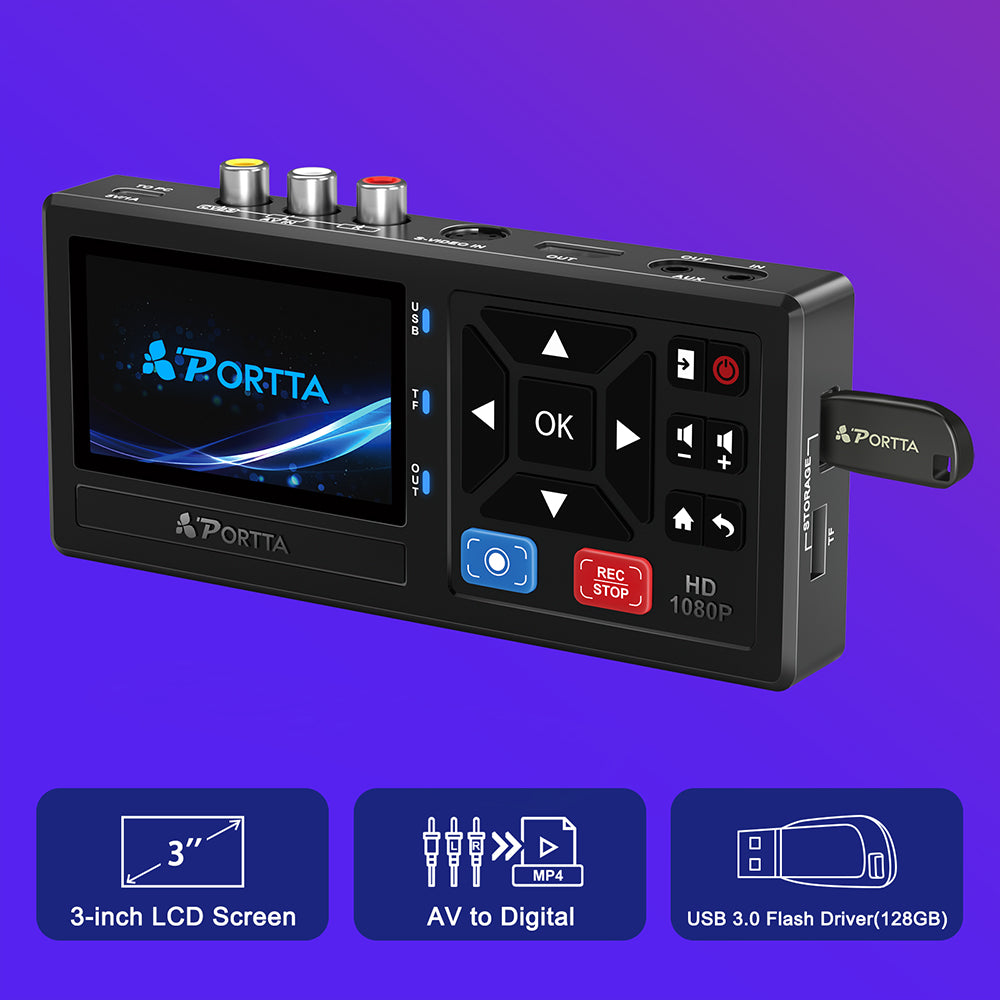
【ビデオデジタルコンバーター】アナログビデオとオーディオを最大1080P 30Hzのデジタルフォーマットに変換します。AV/RCA、Sビデオ、AUX入力に対応。プラグアンドプレイで、PCやソフトウェアは不要です。ご注意:本製品はコンバーター/レコーダーのみで、テープ/DVDを単体で再生することはできません。

【USB/SD ストレージ&プレビュー】 3.0 インチ LCD と内蔵スピーカーを搭載。USB ドライブまたは TF カード (別売) をサポートし、直接再生やスナップショットのプレビューが可能です。大容量 USB には外部電源が必要になる場合があります。

【ビデオ&オーディオフォーマット】ビデオはMP4、オーディオはMP3で録画できます。NTSC/PALフォーマット、最大48KHzのLPCMオーディオに対応しています。録音の際は、適切な入力接続とミュート解除の設定をご確認ください。

【幅広い互換性】VHS、VCR、DVR、DVD、Hi8、ビデオカメラ、ミニDV、カセットテーププレーヤー、レトロゲームコンソールのビデオの録画とデジタル化をサポートします。

【パッケージ内容】レコーダーx1、電源アダプター+USB-Cケーブルx1、AVケーブルx1、3.5mmオーディオケーブルx1、ユーザーマニュアルx1 USB 3.0 フラッシュドライブ 128GB x1、リモコン x1 (単4電池2本は付属しません)

ディスプレイサイズ 3.0インチプレビューLCD
入力ポート AV(CVBS+R/L)、Sビデオ、AUX 3.5mm
出力ポート HDMI、AUX 3.5mm
保管方法 USBドライブ/TFカード
CVBS Input 480i@60 (NTSC), 576i@50 (PAL)
S-Video Input 480i@60 (NTSC), 576i@50 (PAL)
録画解像度 最大1080P@30Hz
Loop Out Resolution Up to 1080P@60Hz
スピーカー 内蔵(右側のみ、ステレオミックス)
UVC/UAC Windows Only
サポートされている形式 NTSC-M/J 3.58、NTSC 4.43、PAL B/G/H/I/D(PAL/N)

    Compare our products

    商品比較表
    リモコン付きビデオデジタルレコーダー、VHS、VCR、DVR、DVD、Hi8、ミニDVプレーヤー、カムコーダー、ゲーム機に対応

    リモコン付きビデオデジタルレコーダー、VHS、VCR、DVR、DVD、Hi8、ミニDVプレーヤー、カムコーダー、ゲーム機に対応

    通常価格 $128.99 USD
    128GB USB 3.0 フラッシュドライブ搭載 VHS デジタルコンバーター

    128GB USB 3.0 フラッシュドライブ搭載 VHS デジタルコンバーター

    通常価格 $139.99 USD
    VHS to Digital Converter with 5

    VHS to Digital Converter with 5" HD Screen AV + S-Video

    通常価格 $179.99 USD
    VHS to Digital Converter with 5

    VHS to Digital Converter with 5" HD Screen

    通常価格 $179.99 USD
    詳細を見る 詳細を見る 詳細を見る 詳細を見る
    Model
    Model VD10 (CHR101) Model VD10 (CHR101-U3) Model VD20P Model VD22P (CHR202P)
    Display Size
    Display Size 3.0" Preview LCD Display Size 3.0" Preview LCD Display Size 5.0" Preview LCD Display Size 5.0" Preview LCD
    Input Ports
    Input Ports AV (CVBS+R/L), S-Video, AUX Input Ports AV (CVBS+R/L), S-Video, AUX Input Ports AV (CVBS+R/L), S-Video, AUX Input Ports AV (CVBS+R/L), Component(YPbPr), AUX
    Output Ports
    Output Ports HDMI, AUX 3.5mm Output Ports HDMI, AUX 3.5mm Output Ports HDMI, AUX 3.5mm Output Ports HDMI, AUX 3.5mm
    Output Storage
    Output Storage USB / TF Output Storage USB Drive / TF Card Output Storage USB / TF / Portable Drive(5TB Max) Output Storage USB / TF / Portable Drive(5TB Max)
    Recording Resolution
    Recording Resolution Up to 1080P@30Hz Recording Resolution Up to 1080P@30Hz Recording Resolution Up to 1080P@60Hz Recording Resolution Up to 1080P@60Hz
    Loop Out Resolution
    Loop Out Resolution Up to 1080P@60Hz Loop Out Resolution Up to 1080P@60Hz Loop Out Resolution Up to 1080P@60Hz Loop Out Resolution Up to 1080P@60Hz
    Supported Formats
    Supported Formats NTSC/PAL Supported Formats NTSC/PAL Supported Formats NTSC/PAL/SECAM Supported Formats NTSC/PAL/SECAM
    UVC/UAC
    UVC/UAC Windows Only UVC/UAC Windows Only UVC/UAC Windows Only UVC/UAC Windows Only
    Aspect Ratio (1080p)
    Aspect Ratio (1080p) 16:9 Aspect Ratio (1080p) 16:9 Aspect Ratio (1080p) 4:3 / 16:9 Aspect Ratio (1080p) 4:3 / 16:9
    External Battery Slot
    External Battery Slot External Battery Slot External Battery Slot External Battery Slot
    Image Settings
    Image Settings Image Settings Image Settings Image Settings
    With USB 3.0 Flash (128GB)
    With USB 3.0 Flash (128GB) With USB 3.0 Flash (128GB) With USB 3.0 Flash (128GB) With USB 3.0 Flash (128GB)

    FAQs

    Still need help? Contact PORTTA Support and include your recorder model and a description of the issue.

    Before Purchase

    1. Can the VD10 read VHS tapes, camcorder tapes, or DVDs directly?

    No. The VD10 is a recorder, not a player.

    It cannot read or play VHS tapes, camcorder tapes, DVDs, or other physical media directly. A separate playback device, such as a VCR, camcorder, or DVD player, is required to provide the video signal.

    2. What devices can I connect to the VD10?

    The VD10 can record from devices that provide AV (RCA) or S-Video output, including:

    • VHS VCRs
    • Camcorders
    • DVD players
    • Retro game consoles
    • Other analog video sources

    Note: Component (YPbPr) video is not supported.

    3. Do I need a computer to record?

    No.

    No. The VD10 records incoming AV or S-Video signals directly to a USB flash drive or TF/MicroSD card without requiring a computer.

    4. Does the VD10 support HDMI input?

    No.

    The HDMI port is for video output only. It cannot be used as a video input.

    5. What format are the recordings saved in?

    In CVBS (AV) and S-Video modes, recordings are saved as MP4 (H.264) files. In AUX mode, recordings are saved as MP3 files.

    Troubleshooting & Support

    1. Why does the recorder show "No Signal"?

    The VD10 is not receiving a valid video signal.

    Please make sure:

    • The source device is powered on and playing video.
    • The AV or S-Video cables are connected correctly.
    • The correct input source is selected on the VD10.
    • The source device is capable of outputting an AV or S-Video signal.

    If possible, connect the source device directly to a TV or monitor using the same cables. If the TV also shows no picture, the issue is likely related to the source device or cable rather than the recorder.

    2. Why does the recorded file appear corrupted or cannot be played?

    In many cases, the recording was not stopped and saved correctly.

    To ensure recordings are saved properly:

    1. Press the red REC/STOP button to start recording.
    2. When recording is finished, press the REC/STOP button again to stop recording.
      Wait for the "Saving..." message to disappear.
    3. Do not disconnect power or remove the storage device until the save process is complete.
    4. You can also play the recording directly on the VD10 to verify whether the file can be played on the recorder itself.

    If the issue persists, try another USB flash drive or TF/MicroSD card and record a short test video.

    3. Why is the built-in screen black or not displaying anything?

    This is normal when an HDMI display is connected.

    When an HDMI cable is connected, the VD10 automatically routes both video and audio through the HDMI output. As a result, the built-in screen turns off and the built-in speaker is muted.

    The recording function is not affected.

    To restore the built-in screen and speaker, simply disconnect the HDMI cable from the VD10.

    4. Why did recording stop unexpectedly?

    Recording may stop unexpectedly for several reasons:

    • The input signal becomes unstable or is lost. This is commonly caused by playback issues from a VCR or camcorder, damaged tapes, dirty video heads, or loose cable connections.
    • The storage device has insufficient free space. The VD10 requires more than 500 MB of available storage space to record. If the remaining free space is 500 MB or less, recording may stop or cannot be started.
    • If you are using a VCR, unstable signals may sometimes be caused by dirty video heads or tape playback issues. Verifying the source signal and trying another storage device can help identify the cause.

    For additional information about cleaning VCR video heads, the following video may be helpful:

    https://www.youtube.com/watch?v=4sGq1CW6AuU

    5. Why does the recorder show "Not Enough Free Space"?

    This is often caused by multiple partitions on the USB drive.

    The VD10 can only recognize the first partition on a USB drive. If most of the available space is located in another partition, the recorder may display "Not Enough Free Space" even when free space is available.

    • For best compatibility:
    • Use exFAT format.
    • Use a single partition.
    • Reconnect the USB drive after formatting.

    We recommend using a USB 3.0 flash drive formatted as exFAT.